

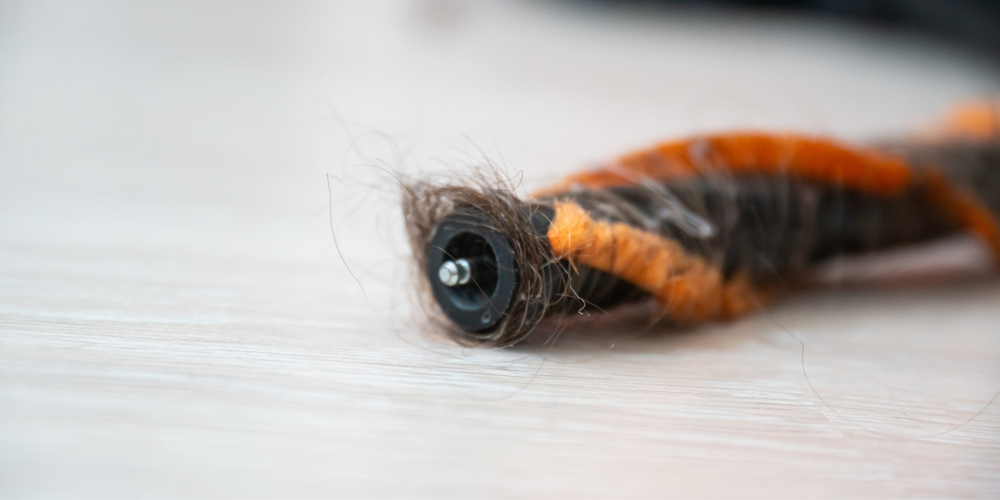
It’s a familiar story for all home cleaning enthusiasts; you’re halfway through vacuuming when you notice something isn’t quite right. Your vacuum is still running, but the brush bar in the floorhead has stopped spinning.
A brush bar can stop turning for several reasons, from tangled hair and an accidental blockage to a protection feature being activated. The exact solution will depend on your VAX vacuum cleaner, so you should always check the user guide for your particular model.
Before you do, there are a few simple things you can check to hopefully solve the issue.
First, switch off your vacuum cleaner
Before inspecting the brush bar, floorhead or any other part of your vacuum, switch the machine off and disconnect it from its power source.
For a corded vacuum, unplug it from the mains. If you have a cordless vacuum with a removable battery, follow the instructions in your user guide for safely switching off and inspecting the machine.
Never attempt to remove an obstruction while your vacuum cleaner is running.
Check the floorhead for a blockage
Vacuum cleaners are designed to pick up everyday dirt and debris, but larger objects can become caught in the floorhead. Socks, pieces of paper and other household objects can all cause problems if they’re accidentally vacuumed up. Rug tassels and loose fabric can also become caught around a rotating brush bar.
Inspect the floorhead and remove any obvious obstruction according to the instructions for your vacuum.
Once the obstruction has been safely removed, follow your user guide to reassemble and restart the vacuum.
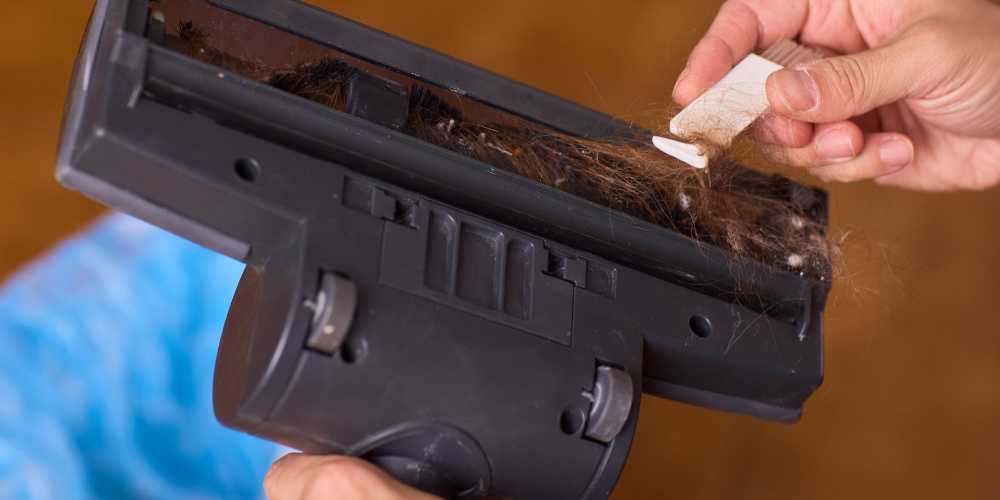
Check the brush bar for tangled hair
If there isn’t an obvious blockage, take a closer look at the brush bar. Long hair, pet hair, fibres and threads can gradually become wrapped around a rotating brush. If enough material accumulates, it can restrict the brush bar’s movement.
How you access and clean the brush bar varies between VAX vacuum cleaners, so check the maintenance section of your model’s user guide before removing any components.
Some current VAX cordless vacuum cleaners also include features designed to help manage hair around the brush roll. For example, selected HomePro models feature HairWrap Resist, which helps prevent long, short and pet hair from wrapping around the brush roll.
Even with hair-management technology, it’s still worth checking your floorhead as part of your regular vacuum maintenance.
Has the vacuum’s protection system been activated?
An obstruction doesn’t necessarily mean something has broken. Some vacuum cleaners include protection systems designed to stop the brush bar or motor when a blockage or other problem is detected. The steps required to get the machine running normally again can differ between models.
If you’ve cleared an obstruction but the brush bar still isn’t turning, don’t repeatedly switch the vacuum on and off in an attempt to reset it.
Instead, check the troubleshooting section of the user guide for your exact VAX model. It should explain whether your machine has a protection or reset feature and the correct procedure to follow.
Check whether the brush bar needs to be switched on
Depending on your vacuum cleaner, the brush bar may not operate in every setting or configuration.
Some models allow aspects of the floorhead or brush operation to be controlled depending on the surface you’re cleaning. If your brush isn’t turning, check the controls and settings against the instructions in your user guide.
If you’ve recently changed the vacuum’s setting or moved between different floor types, this is a particularly quick thing to check.
Check that everything is fitted correctly
If you’ve recently cleaned your vacuum or removed the floorhead, brush bar or another component for maintenance, make sure everything has been refitted correctly. A component that hasn’t clicked fully back into place could prevent the machine from operating as expected.
Again, don’t force any part into position. Your VAX user guide will show you how removable components should be fitted for your particular model.
Could there be another blockage?
The brush bar may be where you’ve noticed the problem, but it’s worth checking the rest of the vacuum too.
A blockage elsewhere in the airflow path can affect cleaning performance and may cause your vacuum to behave differently.
Depending on your model, check accessible areas such as:
- The floorhead
- Reach wand or tube
- Hose
- Dirt container
- Filters
Only inspect or remove components according to the instructions provided for your vacuum cleaner.
If you’ve noticed a loss of suction as well as a problem with the brush bar, a blockage or maintenance issue elsewhere in the machine is particularly worth investigating.
Clean your filters regularly
Vacuum cleaner filters are another important part of vacuum cleaner maintenance.
Over time, dust and debris can build up on them and affect performance. Check your user guide to find out where your filters are located, how frequently they should be cleaned and whether they’re washable.
If a filter is washable, make sure it’s completely dry for the period specified by the manufacturer before putting it back into the vacuum.
Never put a wet or damp filter back into your machine unless the instructions for your particular model explicitly say otherwise.
How to help prevent brush bar blockages
A little preparation before you vacuum can help prevent many floorhead problems.
Take a quick look around the room and pick up objects that aren’t intended to be vacuumed, particularly socks, cables, pieces of string and small toys.
Be careful around:
- Rug and carpet tassels
- Curtain edges
- Loose threads
- Charging cables and electrical leads
- Shoelaces
- Small pet toys
- Long pieces of string or ribbon
It’s also worth periodically inspecting the brush bar rather than waiting until it stops moving. Removing accumulated hair and fibres as part of routine maintenance can help keep your vacuum ready for its next clean.
What if the brush bar still won’t spin?
If you’ve removed visible obstructions, checked the brush bar and followed the troubleshooting instructions for your model but it still won’t rotate, don’t dismantle the vacuum beyond the maintenance procedures described in your user guide.
The next step is to get model-specific help.
Visit VAX Support to find troubleshooting information and support for your vacuum cleaner. Having your model or product number to hand can make it easier to find the information relevant to your machine.
If a component needs replacing, use a part that’s compatible with your specific VAX model rather than assuming that brush bars, filters, belts or other components are interchangeable between vacuum cleaners.







 Vax Staff